
Chats, templates, campaigns and calls on the official WhatsApp Business Platform.
LiveOfficial Meta Tech Provider · WhatsApp Business Platform
Every customer conversation,
in one place.
WhatsApp chats and calls, AI agents, campaigns and your customer list — in one place your whole team works from.
7-day free trial · No card needed · WhatsApp, Instagram and web chat, live today in one inbox.
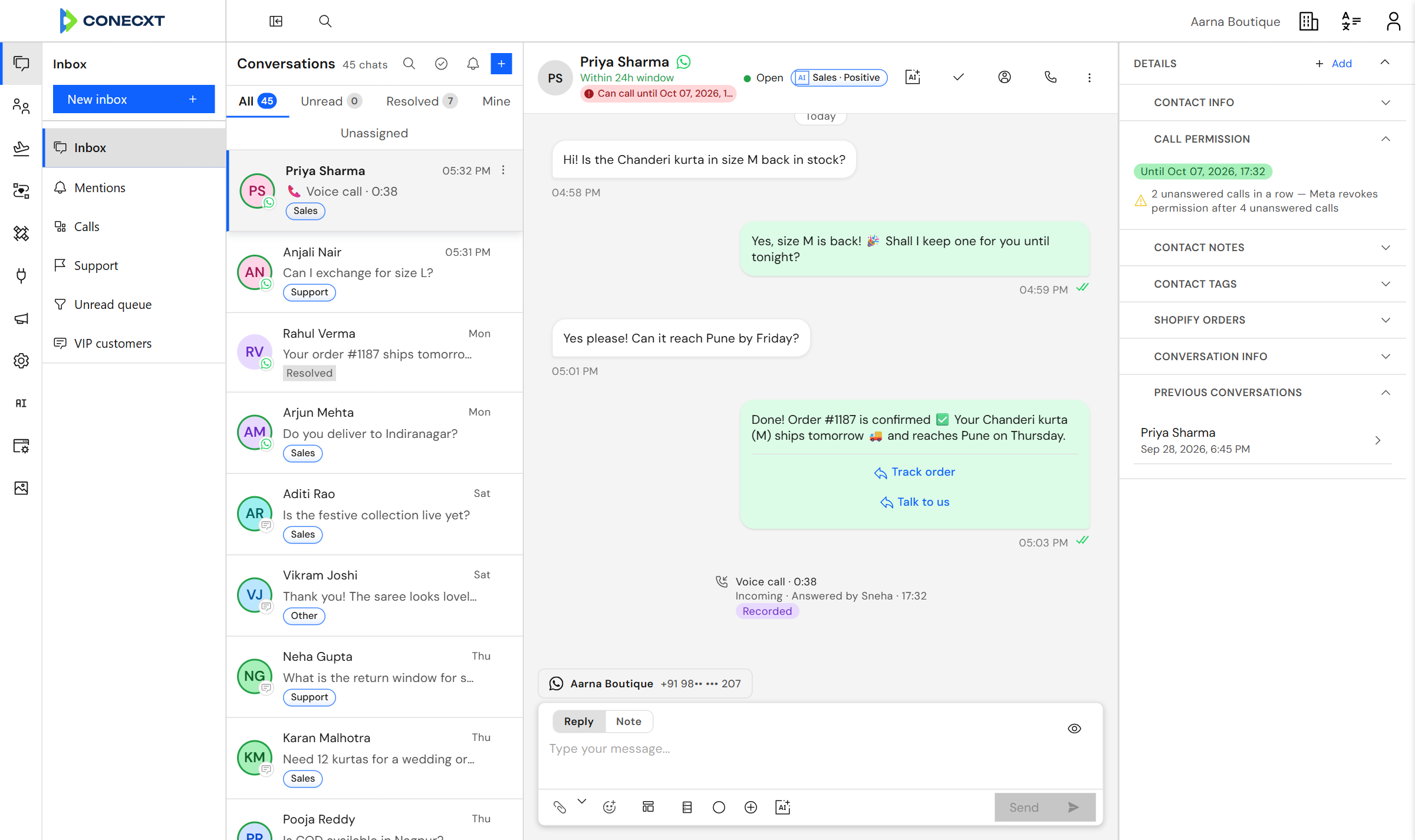
Every chat, one inboxAll your WhatsApp conversations, for the whole team.
AI reads every chatEach conversation is tagged by topic and mood, automatically.
Calls, saved in the chatAnswered in the browser, and recorded if you choose.
AI agentsNew
AI agents that answer for you
Teach an agent your documents and website. It answers customers on WhatsApp and web chat, and hands over to your team when it should.
- Answers come from your own documents and website pages.
- Hands the chat to a person, with a summary of what happened.
- Replies with buttons and lists, in your brand’s voice.
- Try it in a test panel before it talks to a customer.
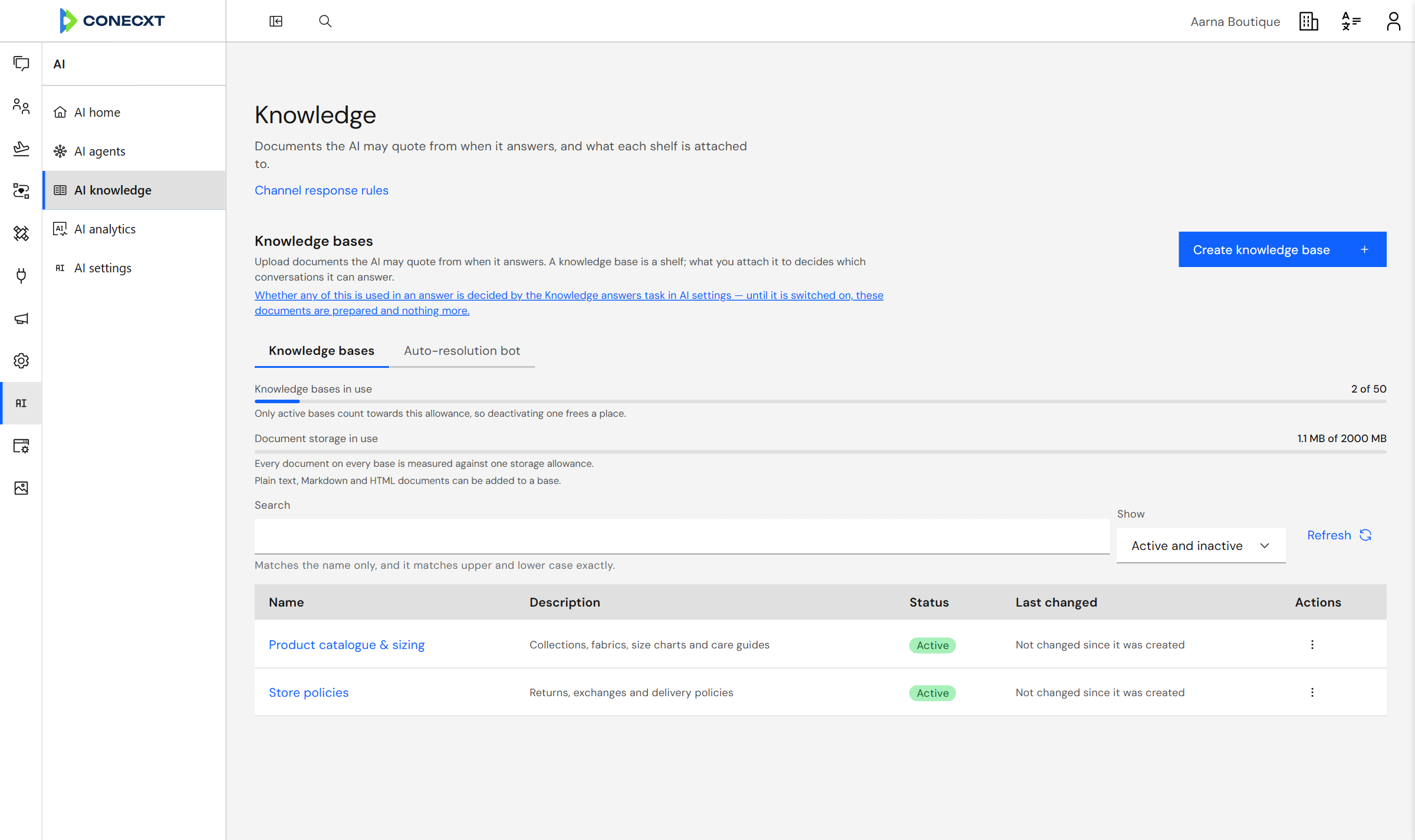
Answers from your catalogue and policies
WhatsApp CallingNew
Take WhatsApp calls in your inbox
Customers call your WhatsApp number, and your team answers in the browser — no phone passed around the office.
- Everyone on the team can pick up; the first to answer takes it.
- Call customers back once they say yes.
- Every call lands in the chat and the customer’s history.
- Voicemail, missed-call alerts and optional call recording.
Calling is switched on per number, for numbers Meta allows to take calls.
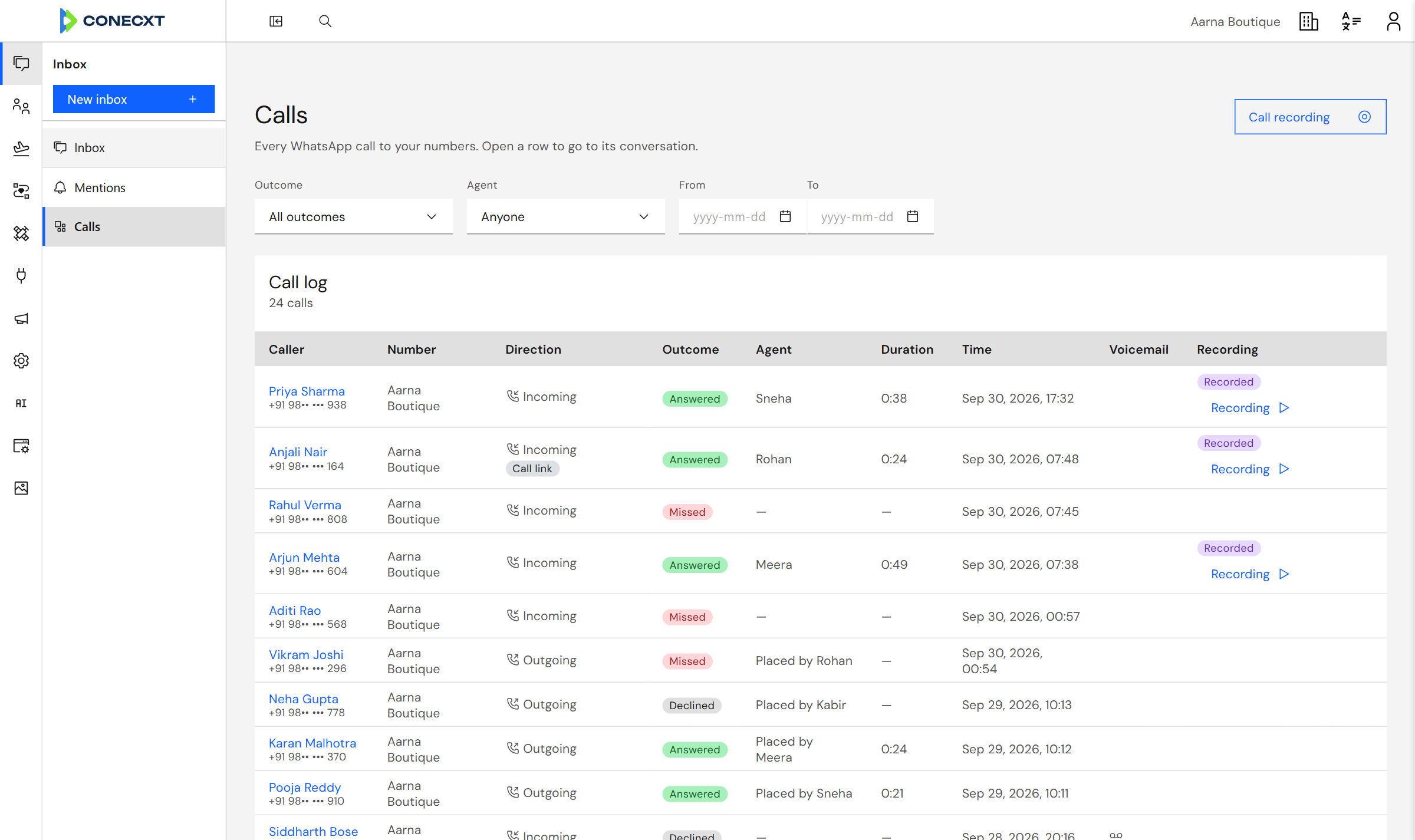
Recorded, if you switch it on
Customers can call from a link
Team Inbox
Answer everyone from one place
Every WhatsApp conversation lands in one inbox your whole team can see.
- Assign a chat to yourself, a teammate, or a whole team.
- Leave private notes the customer never sees.
- Suggested replies and one-click summaries, from AI.
- Mention someone and they hear about it straight away.
Reply buttons in the chat
Call permission at a glance
Campaigns
Reach thousands, and know who read it
Send one message to thousands, then see what happened to each of them.
- Build the audience from your own contact list.
- Send it now, or pick a time.
- Watch delivered and read counts fill in as WhatsApp reports them.
- See who tapped a button in the message.
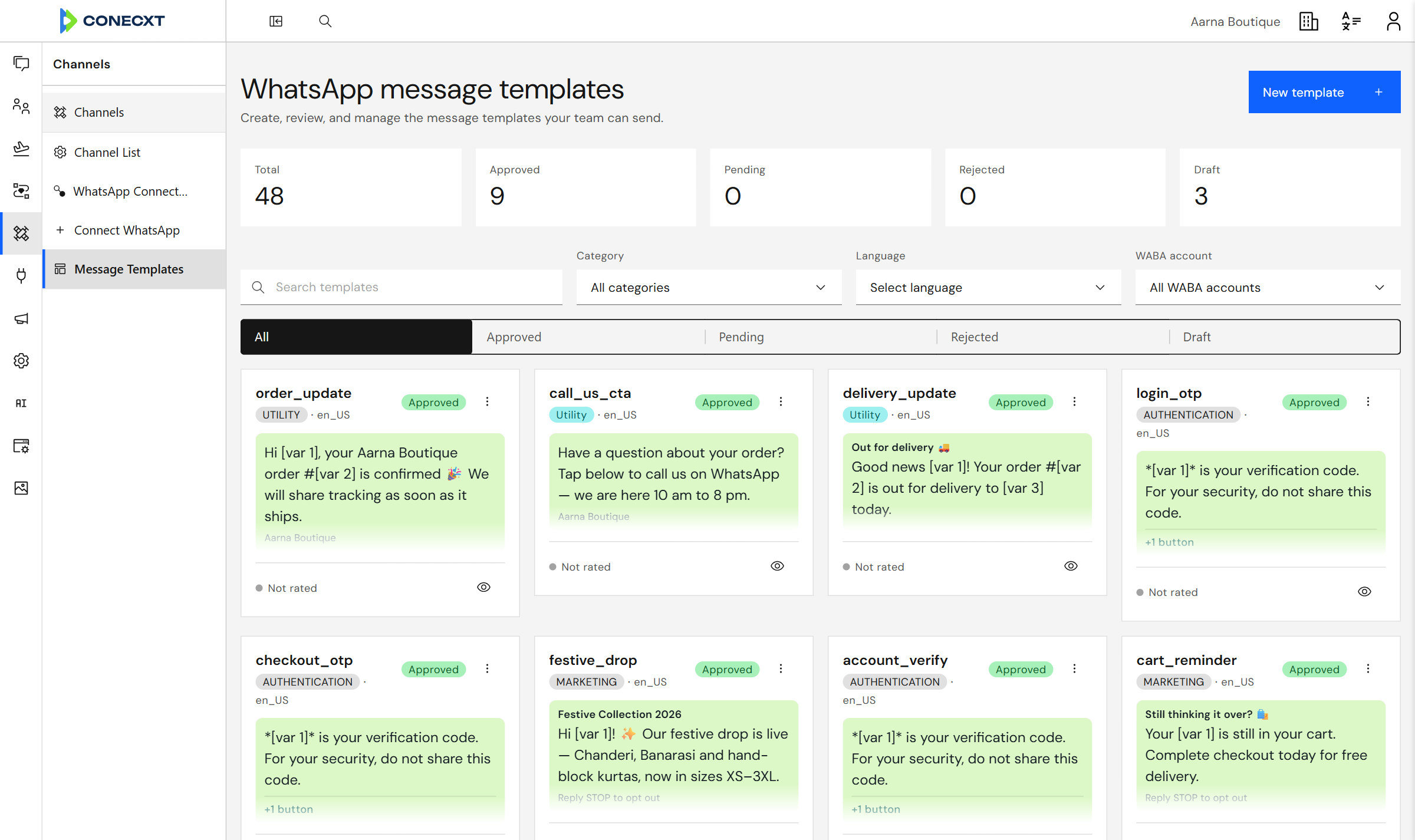
Approved by WhatsApp, ready to send
Automation
Follow up without remembering to
Draw a follow-up once, and it runs for every customer without you.
- Drag steps onto a canvas: send, wait, check something, tag a contact.
- Start from a message, a button tap or a Shopify order.
- Try a run before you publish it, without touching your real numbers.
- Watch each run step by step, and retry the ones that stall.
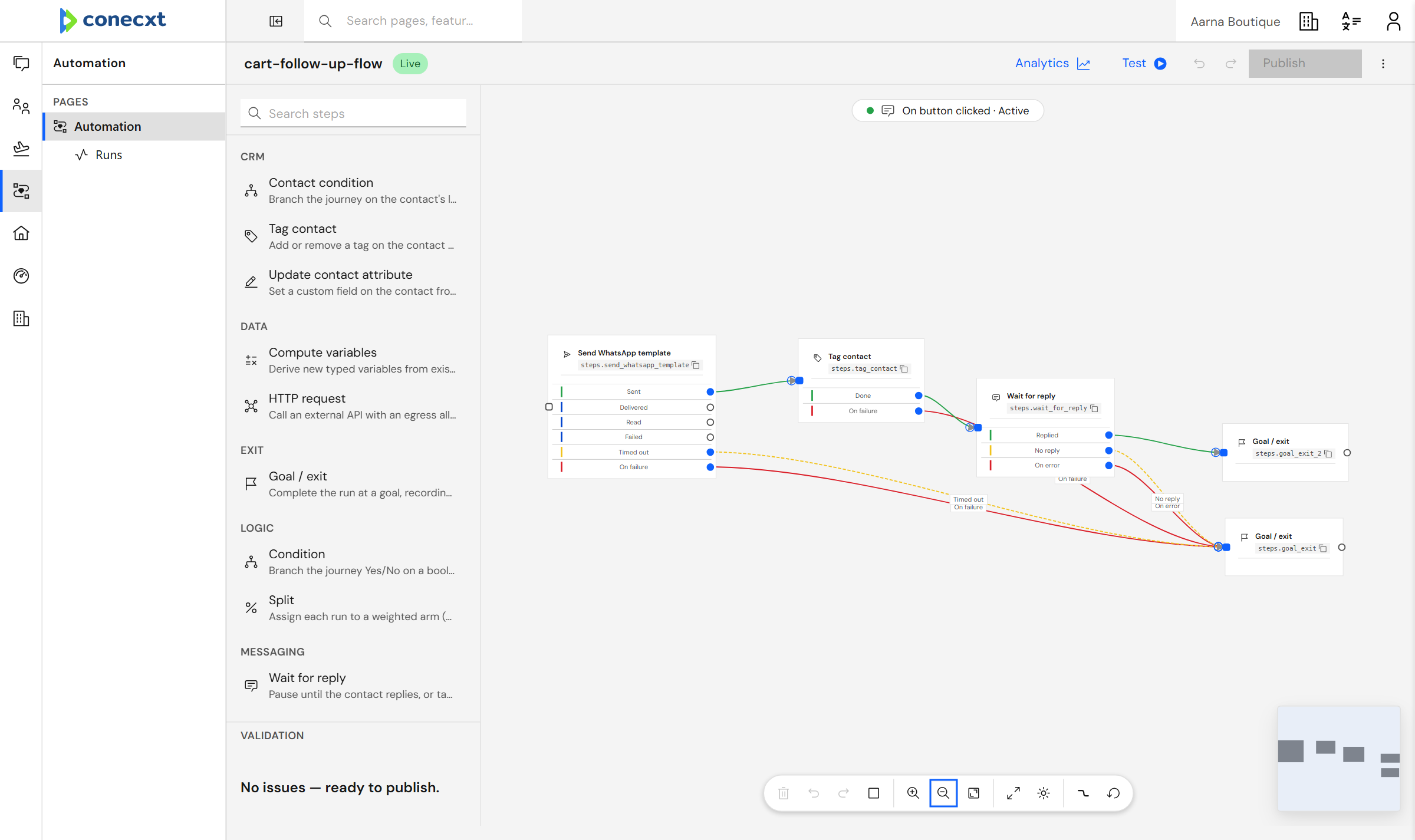
Branches on what WhatsApp reports
Contacts
Know who you are talking to
Who the customer is sits beside what they said — not in another tab.
- Tags, extra fields and stages that you name yourself.
- Bring a list in from a spreadsheet, and undo it if it goes wrong.
- Group people by rules, then send to that group.
- Notes, activity and past chats in one timeline.
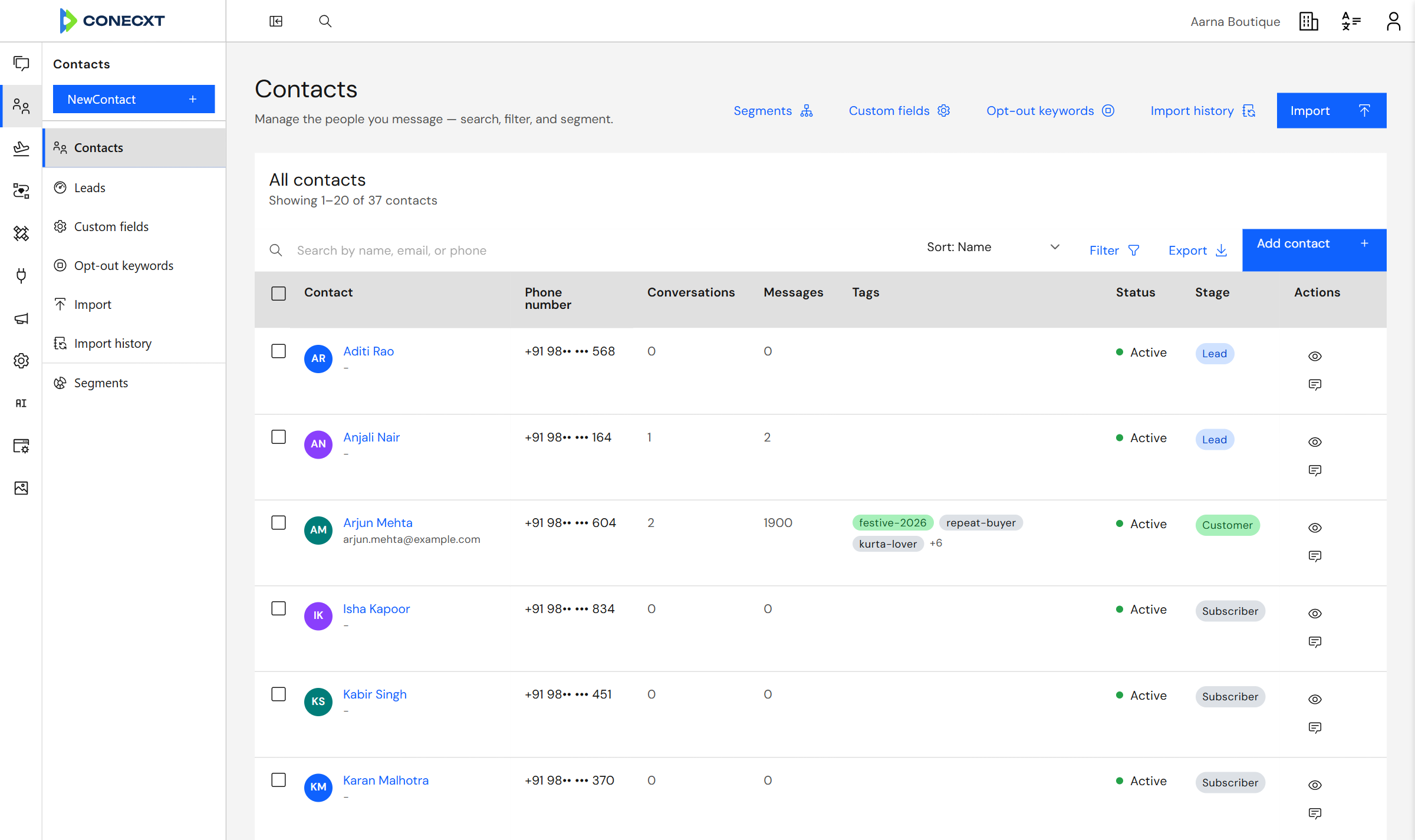
Tags you name yourself
Every conversation, one inbox
WhatsApp, Instagram messages and comments, and the chat on your website land in the same inbox, on the same customer record.
Web chat
A chat widget for your website. Visitors’ messages land in the same inbox as WhatsApp.
LiveDirect messages and comments on your posts, in the same inbox. Rolling out workspace by workspace.
LiveWorks with your store and your ads
Shopify
See a customer’s Shopify orders beside the chat, send products and payment links, and win back abandoned carts.
Click-to-WhatsApp ads
Know which Click-to-WhatsApp ad each chat came from, and when its free window closes.
See it run for your business
Pick the one closest to yours. Same platform, set up the way your trade runs.
What breaks today
Order questions, abandoned carts and returns arrive faster than a small team can answer them.
One person is answering “where is my order?” all day while the carts nobody chased quietly expire.
The answers exist — in the shop admin, in a spreadsheet, in somebody’s phone — just never in the same place as the customer.
How the work runs instead
- A cart is left.
- A follow-up goes out an hour later.
- If they reply, it lands in the shared inbox with their order history beside it.
What your customer sees
- Cart left at 8:05 pm · reminder 1 hour later
- Aarna Boutique: Template · marketing Hi Priya, your Chanderi kurta in size M is still in your bag. We have kept it for you until tomorrow night. 9:05 pm
- Complete my order
- I have a question
- Priya Sharma: I have a question 9:12 pm
- Priya Sharma: Will it reach Nagpur by Saturday? Need it for a function 9:12 pm
- Handed to the support team
- Aarna Boutique: Hi Priya, Sneha here. Orders placed tonight reach Nagpur by Friday. 9:14 pm
What breaks today
Enquiries come in from many listings at once and go cold before an agent replies.
The first agent to answer usually wins the viewing — and on a busy day nobody answers for hours.
Leads sit in one person’s phone, so when they are out, the lead is out with them.
How the work runs instead
- An enquiry arrives, gets an instant acknowledgement, and is handed to whichever agent covers that area — with the whole thread attached.
What your customer sees
- Sneha Kulkarni: Hi, I am interested in Baner Hills — 2BHK 7:42 pm
- Baner Hills Realty: Hi Sneha, thanks for asking about Baner Hills. What would help most right now? 7:42 pm
- Book a site visit
- Price & floor plan
- Call me back
- Sneha Kulkarni: Book a site visit 7:43 pm
- Tagged: Baner Hills · assigned to West Pune team
- Baner Hills Realty: Great. This is Rohan from our West Pune team — Saturday or Sunday? 7:45 pm
- Saturday
- Sunday
What breaks today
Admissions cycles create bursts of repetitive questions against hard deadlines.
For six weeks a year, the same questions arrive hundreds of times a day, and every one has a deadline behind it.
The rest of the year the team is far too small to have built anything for it.
How the work runs instead
- A parent asks about a deadline.
- The answer goes out at once, and anything unusual reaches a real person with the full thread.
What your customer sees
- Arjun Mehta: hi what is the fees for JEE 2-year programme 9:15 am
- Northstar Academy: Hi Arjun! Here is the fee sheet for the 2-year JEE programme, with the instalment plan. 9:15 am
- PDF sent · Tagged: JEE 2-year
- Northstar Academy: What else can we help with? 9:15 am
- Batch timings
- Scholarship test
- Talk to a counsellor
- Arjun Mehta: Talk to a counsellor 9:17 am
- Handed to the JEE counsellor team
Live in four steps
No developers needed.
- 1Create your account — the first 7 days are free.
- 2Sign in with Meta, and your number is set up for you.
- 3Invite your team by email and give each person a role.
- 4Bring your contacts in from a spreadsheet.
Connect WhatsApp
Sign in with the Meta account that owns your business, then pick the number.
Continue with Meta Aarna BoutiqueWhatsApp Business number Connected
See it actually working
- A new conversation reaches your inbox in about 44 milliseconds.
- Delivery and read ticks come straight from WhatsApp, not from us.
- Every automation run is listed, step by step, as it happens.
Worth reading next
All resources →Playbooks and platform news for businesses that sell on WhatsApp.
WhatsApp, Instagram and web chat, one inbox
Conecxt now brings WhatsApp, Instagram Direct messages and comments, and website chat into one shared team inbox, with the same automations and CRM behind all three.
DoubleTick pricing: ₹3,500 a month billed quarterly, the AI-agents switch, and what the add-on column leaves out
DoubleTick's plans as read on 11 Oct 2026: Starter ₹3,500 a month billed quarterly, Pro ₹5,200 without AI agents or ₹9,200 with them, all plus GST, its rate sheet, add-ons and five alternatives.
Gallabox pricing: ₹2,999 a month billed quarterly, the three-user cap, and what the markup line means
Gallabox's plans as read on 11 Oct 2026: Basic ₹2,999 a month billed quarterly and capped at 3 users, Essential ₹6,999 and Advanced ₹16,999, plus its rate card, add-ons and five alternatives.
Questions, answered plainly
What does Conecxt do?
It runs your WhatsApp conversations, campaigns and customer records in one place, so nothing has to be copied between apps.
Do I need my own WhatsApp Business account?
Yes. You sign in with Meta and your number is set up for you.
Can my whole team work from one number?
Yes. Everyone answers from one shared inbox, and each chat can be given to a person or a team.
Does it work with anything besides WhatsApp?
Yes. Instagram messages and comments, and a chat widget on your website, land in the same inbox as WhatsApp.
Can AI answer my customers?
Yes. An AI agent answers from your documents and website, and hands the chat to your team when it should. You switch it on yourself.
Can customers call us on WhatsApp?
Yes, once calling is switched on for your number. Your team answers in the browser, and every call is saved in the chat.
Is there a free trial?
Yes. Every new account gets 7 days free, and you do not need a card to sign up.
Can I bring my existing contacts in?
Yes, from a spreadsheet. You get a full import history, and you can undo an import that goes wrong.
What happens to a chat when someone is away?
Hand it to anyone on the team. The history stays with the customer, not with the person who answered.
See it with your own customers
Bring your own number and your own contacts. See it work before you decide.