
Resources Insight
Customer retention on WhatsApp: five date-based messages that bring repeat customers back
Most repeat orders a small brand loses are lost to memory: nobody messaged the customer when the serum ran out or the birthday came round. Five messages can go out because of a date instead. Here is who each suits, how it's set, what Meta charges and where it falls short.
The short version
- Five messages can go out because of a date rather than someone's memory: a welcome check-in, a reorder nudge, a birthday greeting, a renewal or service reminder, and an order anniversary.
- All five are likely marketing at ₹0.8631 per delivered message in India, ₹863.10 per 1,000, so they go only to people who opted in to offers. A payment-due reminder on a plan the customer already has is likely utility, at ₹115 per 1,000.
- A date trigger counts forward from a date and can't fire before one. To remind someone ahead of a date, count from last year's date or store the reminder date itself in a custom field.
- WhatsApp caps how many marketing messages one person gets from all businesses, so plan your date messages and campaigns together: we'd keep it to two marketing messages per customer a month.
- Count each message's delivered, read, replies, orders within seven days, opt-outs and 131049 failures. Count today's matches before you publish anything.
Mitali Ghoshal runs a skincare brand from Kolkata that sells online through a Shopify store, with a team of seven. (Mitali and her brand are invented.) Her best seller is a vitamin C serum that lasts most people about six weeks. Every month someone on the team means to message the customers who bought it in October, and every month the day goes by under packing and Instagram replies.
That’s how most small brands lose repeat customers: not to a competitor, but to memory. Customer retention on WhatsApp gets easier when some messages go out because a date came round. This piece covers five of them, how each is set, what Meta charges, and where each falls short. Separate playbooks in this series go deeper on four of them: Shopify order-anniversary reminders, Shopify reorder reminders, birthday and anniversary messages, and renewal and service-due reminders.
What are date-based WhatsApp messages?
Date-based messages are the ones that go out because a date arrived: a birthday, the day an order is likely to run out, a renewal, a year since a purchase. They help retention when they’re set up once and left to run, because nobody has to remember.
Every one of them starts a conversation, so on the WhatsApp Business Platform each is an approved template, and Meta decides its category at review.
Five messages a date can send
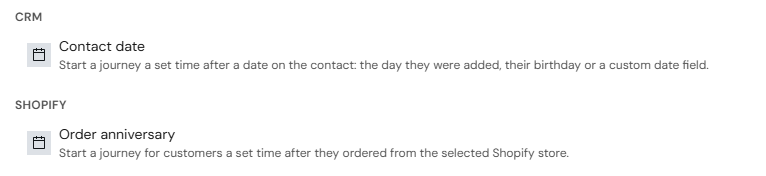
All five are likely marketing, at ₹0.8631 per delivered message to an Indian number before GST, so ₹863.10 per 1,000 on Meta’s INR rate card effective 1 October 2026. The settings below are the ones in Conecxt’s two date triggers, “Contact date” and “Order anniversary”.
| Message | Trigger and setting | Likely category, per 1,000 delivered | The limit |
|---|---|---|---|
| Welcome check-in | Contact date, Contact created date, 3 Days, No repeat | Marketing, ₹863.10 | Counts from the day the contact was added |
| Reorder nudge | Order anniversary, 40 Days, No repeat, “Skip customers who have ordered again since” on | Marketing, ₹863.10 | Can’t tell products apart |
| Birthday | Contact date, Birthday, 0 Days, Every year | Marketing, ₹863.10 | Only for birthdays you have, given with consent |
| Renewal or service reminder | Contact date, a custom date field, 0 Days, No repeat | Marketing, ₹863.10; utility at ₹115 if it’s a payment due | Forward only, so the field holds the reminder date |
| Order anniversary | Order anniversary, 358 Days, No repeat, “Once per customer per day” | Marketing, ₹863.10 | No product name in the message |
The welcome check-in
It suits a brand that adds people as contacts when they first buy or sign up. Three days in, Mitali’s message asks whether the patch test went well and offers help with the routine. Use 1 day or more after “Contact created date”, never 0: with 0, people added later the same day are missed. The catch is that this date is the day the contact was added, so a list imported in one go all falls due on the same morning. Count the matches first.
The reorder nudge
It suits a store with one main consumable or one typical cycle. Pick the number of days from your own reorder gaps: Mitali’s repeat buyers mostly reorder between day 38 and day 50, so the nudge goes at 40. Switch on “Skip customers who have ordered again since”, or people who already reordered get asked to reorder. The trigger counts from the order date for every order and has no filter by product, so a store selling a six-week serum and a four-month moisturiser shouldn’t run one nudge for both.
The birthday
It suits anyone who has collected birthdays with the customer’s agreement. Meta’s own marketing examples include a birthday wish, under messages that “Strengthen customer relationships through personalized messages”, so a greeting is likely marketing with or without an offer. It goes only to people who opted in to offers. Our personalisation guide covers where a greeting starts to feel like being watched.
The renewal or service reminder
It suits subscriptions, plans and anything due again. Mitali sells a quarterly box, and its reminder goes a week before the box renews. Meta puts messages that “attempt to renew subscriptions” under marketing, “even if requested by users”. A plain note that a payment on a plan the customer already has will be taken on a date is the utility exception, at ₹0.1150. Because the trigger only counts forward, the custom date field holds the day the reminder should go, and someone updates it after each renewal.
The order anniversary
It suits purchases made for an occasion on the same date every year: Mitali’s gift sets bought for a family birthday, or in the week before Christmas. At 358 days after the order, the message lands a week before the same date this year. Festivals that move with the lunar calendar, such as Diwali, don’t fit a fixed count; send those as a campaign. Orders older than 60 days need Shopify’s permission to read the full order history: Shopify’s developer documentation says its order scopes “cover orders created within the last 60 days”, and older orders need an extra scope.
How does the time rule work?
The time rule counts forward from a date, in whole units, at a time of day you choose. Three settings set it: “Time after the date” (0 or more) with a “Unit” of Days, Weeks, Months or Years; “Repeat”, which is No repeat, Every month or Every year; and “Time of day”, in half-hour steps in your organisation’s local time, 10:00 unless you change it.
It can’t fire before a date. There are two honest ways round that. Count from last year, as the order anniversary does: 358 days after an order is a week before the same date this year. Or keep the reminder date itself in a custom date field: for a renewal on 14 March, store 14 February in a field such as “Renewal reminder on”. The field must be of type Date, and its value typed year first, as YYYY-MM-DD. A value written any other way, such as 14/03/2027, never matches and isn’t counted.
Months have a rule for missing days: when the target day doesn’t exist, the last day of the month is used, so one month after 31 January is 28 February. An order or date on 29 February fires on 28 February in ordinary years. Birthdays and custom dates are whole days, which is why 0 is safe for them and not for a created date or an order date.
Three rules catch people out. The journey must be published on the day: days on which it was paused, or not yet published, aren’t made up later. A change to the settings applies from the next day due. And a journey run ends after 30 days, so the long gap belongs in the trigger, never in a wait step.
Count before you publish
Press “Count today’s matches” in the trigger’s panel and it answers in a line such as “37 would be enrolled today”, and for Shopify also “4 skipped: no phone or email”. Nothing is sent by counting. If the number is ten times what you expected, the setting is wrong, and you’ve found out for free.
Opt-in isn’t something the count proves. Your business is responsible for sending marketing templates only to people who opted in: count the day’s matches first, keep opt-in recorded on the contact, and if you record opt-in as a tag or field, check it before the send step. WhatsApp’s policy allows contact only once you “have received opt-in permission from the recipient”. Our opt-in guide has wording that holds up.
How many marketing messages should one customer get in a month?
Two, counting campaigns and date messages together. That’s our rule, since Meta publishes no number, and the reason is WhatsApp’s own cap.
Meta’s per-user page says WhatsApp “may limit the number of marketing template messages a WhatsApp user receives from any business in a given period”, based partly on “an individual’s recent marketing message read rate”. The cap covers every business messaging that person, so your birthday greeting competes with a bank and a grocery app. A held-back message fails with error 131049, and Meta says to “wait at least 24 hours before attempting to resend”. One exception helps: marketing messages sent inside a 24-hour window the customer opened by replying “do not count towards the limit”.
Mitali’s collision is typical. One customer has a birthday on 12 March and a serum due on 14 March. A journey doesn’t compare dates, so nothing stops both. Her fix is in the wording: the birthday message is a greeting with no offer, and the reorder nudge carries the offer. Over a month she checks each journey’s 131049 share. When it rises while reads fall, the list is telling her something.
What does it cost for Mitali’s month?
About ₹1,010 before GST for the five messages together. The volumes are the example’s own, counted after leaving out everyone without an opt-in to offers; the rate is Meta’s ₹0.8631 per delivered marketing message.
| Message | Sent in a month | Meta charge |
|---|---|---|
| Welcome check-in | 300 | ₹258.93 |
| Reorder nudge at 40 days | 380 | ₹327.98 |
| Birthday | 150 | ₹129.47 |
| Quarterly box renewal | 80 | ₹69.05 |
| Order anniversary | 260 | ₹224.41 |
| Total | 1,170 | 1,170 × ₹0.8631 = ₹1,009.83 |
Mitali keeps about ₹450 on a ₹1,300 serum (her figure, illustrative), so three extra orders pay for the month. The question is whether they’re extra, which is the next section.
What to measure
For each of the five, count delivered, read, replies, orders within seven days, opt-outs and 131049 failures, every month. Meta reports delivered, read and failed; replies come from the inbox, orders from your store matched by phone number.
Orders within seven days overstate what the message did, because some of those customers would have reordered anyway. For the reorder nudge, compare the share of customers who reorder between day 40 and day 50 in the two months before you switch it on with the two months after. Our marketing ROI guide explains the held-back group, which is the cleaner way. If opt-outs on any message pass its orders, rewrite it, then cut it.
Doing it without a date trigger
It can be done by hand. A sheet sorted by date, filtered each morning, gives you today’s list for a campaign to a filtered segment; the win-back playbook works that way for one send a season. In Shopify Flow, the Wait action stops at 90 days, and Shopify’s own advice for anything longer is “a scheduled workflow instead with a ‘Get data’ action”. Flow’s list of actions has no WhatsApp action, so it ends by tagging customers or emailing your team, and your WhatsApp tool does the sending.
Start with one date
Pick the message with the biggest list behind it. For most online brands that’s the reorder nudge. Work out your own reorder gap from last quarter’s repeat orders, set the days a little before it, count today’s matches, and publish it on a weekday morning. Add the second message a month later, once you’ve seen the first month’s opt-outs. Terms such as per-user limit and utility template are in the glossary.
Common questions
How do I send automated reminders on WhatsApp?
Use a WhatsApp Business Platform tool that can start an automation from a date, such as a birthday, a custom date field or a past order, and send an approved template. The message must be approved by Meta first, and a marketing reminder can go only to people who opted in to offers from you.
Is a WhatsApp birthday or reorder reminder marketing or utility?
Expect marketing. Meta's category guidelines list a birthday greeting under building customer relationships, which is marketing, and reorder nudges and renewal reminders promote a purchase. In India that is ₹0.8631 per delivered message before GST. A reminder that a payment on an existing plan is due can be utility, at ₹0.1150.
How many marketing messages can one customer get on WhatsApp?
Meta publishes no fixed number. WhatsApp limits how many marketing templates one person receives from all businesses combined, partly based on how they have read marketing recently, and a held-back message fails with error 131049. We'd send any one customer no more than two marketing messages a month, campaigns included.
Can a WhatsApp reminder go out before a date, such as a week before a renewal?
Not directly, because a trigger that counts forward from a date can't fire before it. Count from last year's date instead (358 days after an order is a week before the same date this year), or store the reminder date itself, such as 14 February for a 14 March renewal, in a custom date field.
Sources
- Pricing on the WhatsApp Business Platform (Meta for Developers) · Updated 18 Nov 2026, read live 26 Nov 2026; India rates from the INR rate card effective 1 Oct 2026
- Template categorization (Meta for Developers) · Updated 15 Sep 2026, read live 26 Nov 2026
- Per-user marketing template message limits (Meta for Developers) · Updated 17 Jun 2026, read live 26 Nov 2026
- WhatsApp error codes (Meta for Developers) · Updated 24 Nov 2026, read live 26 Nov 2026
- Get opt-in for WhatsApp (Meta for Developers) · Updated 16 Jun 2026, read live 26 Nov 2026
- WhatsApp Business Messaging Policy · Last updated 23 Sep 2026, read live 26 Nov 2026
- Shopify API access scopes, orders permissions (Shopify developer documentation) · No date shown, read live 26 Nov 2026
- Wait action in Shopify Flow (Shopify Help Center) · No date shown, read live 26 Nov 2026
- Actions in Shopify Flow (Shopify Help Center) · No date shown, read live 26 Nov 2026
Run this on your own number
Create an account, connect your WhatsApp number, and invite your team.