
Resources Playbook
Renewal and service-due reminders on WhatsApp: getting the dates right for AMCs and contracts
A service visit falls due after a date you already know. A renewal reminder has to arrive before a date that hasn't happened yet. That difference decides how you store dates and set up any reminder that runs by itself. Here are both set-ups in Conecxt, the sheet-and-campaign version without it, and what each message costs at Meta's India rates.
The short version
- A service-due reminder counts forward from the last visit: store 'Last serviced on' and send 6 months after it, then update the date after every visit.
- A renewal reminder has to arrive before the end date. A trigger that only counts forward needs either the start date plus 11 months, or a field that holds the date the reminder should go.
- Renewal reminders are marketing even when the customer asked for them: ₹0.8631 per delivered message in India before GST. A visit the live contract already covers, or a payment already due, is likely utility at ₹0.1150.
- For 3,200 contracts, a month of renewal, service-due and payment reminders costs about ₹466 in Meta charges, and the renewal line is over 80% of it.
- The free WhatsApp Business app can't send on a date. Without a tool that reads dates, the reminder is a weekly filter on a sheet and a person or a campaign.
Jatin Dogra sells and services water purifiers in Jammu, from a showroom on Residency Road and a store room in Gandhi Nagar where fourteen technicians collect filters and membranes each morning. (Jatin and his business are invented for this playbook.) He has 3,200 annual maintenance contracts. Each includes a filter change every six months and runs out a year after signing. The end dates live in a register, the visit dates in the technicians’ job cards, and renewals slip because nobody looks at the register until a customer calls to say the water tastes odd.
He wants a renewal reminder message on WhatsApp a month before each contract ends, and a service-due reminder when each filter change falls due, without anyone checking the register. This playbook is about the date mechanics, which work the same for an AMC, a pest-control plan, a gym membership or an insurance policy. For trade detail, see our playbooks for home services, car dealers and NBFCs and insurance agents.
Two kinds of date: after one, or before one
A service-due reminder comes after a date you already have; a renewal reminder must come before one. Any reminder that runs by itself counts forward from a stored date, so the second kind needs a trick.
| Reminder | Counts from | Worked date |
|---|---|---|
| Filter change due | Last serviced on 31 August 2026 | 6 months later: 28 February 2027 |
| Renewal, a month ahead | Contract ends 14 March 2027 | Must arrive 14 February 2027 |
The first row also shows month arithmetic. Six months after 31 August would be 31 February, which doesn’t exist, so the last day of the month is used: 28 February. A date on 29 February falls on 28 February in ordinary years.
What you need, and what each message costs
You need the dates on record, a number on the WhatsApp Business Platform, approved templates and opt-in. Meta’s opt-in page says you must “clearly state the business’s name that a person is opting in to receive messages from”; at contract signing, ask separately for service updates and for renewal and offer messages, and record both answers. Our opt-in guide has the wording.
Meta decides the category at review, but its guidelines are clear on the main cases. Messages that “attempt to renew subscriptions” are marketing, and “These are marketing even if requested by users.” Account updates “should not … attempt to secure renewals”, while Meta’s own utility example reads “Reminder: Your monthly payment for {{service}} will be billed on {{date}}”. So:
Renewal, likely marketing (₹0.8631 per delivered message)
Hi {{1}}, your Dogra Aqua care plan ends on {{2}}. Renew this month
and your filter changes carry on without a break. Tap below and we
will call you.
[Renew my plan]  [Call me]  [Stop offers]

Visit covered by the live contract, likely utility (₹0.1150)
Hi {{1}}, the six-monthly filter change in your care plan is due.
Reply with a day that suits you and our technician will confirm a
time.

Payment already due, likely utility (₹0.1150)
Hi {{1}}, the renewal you confirmed on {{2}} has ₹{{3}} due. The
payment link is below. Reply here if it's already been paid.
Keep “renew now and save” out of the visit reminder. One line like that makes the whole template marketing, and Meta can change a template’s category after approval if what it sends doesn’t match. Our category guide covers recategorisation.
Route A, set-up 1: service due, counted from the last visit
Store the date of the last visit and send a set time after it. This counts forward, so it’s the simple case.
- In Conecxt, create a custom field of type Date called “Last serviced on”. Its value must be typed as year-month-day (
YYYY-MM-DD); a value in any other form never matches and isn’t counted. - Import the contracts with a CSV. Try five rows first and open those contacts to check the date landed in the field.
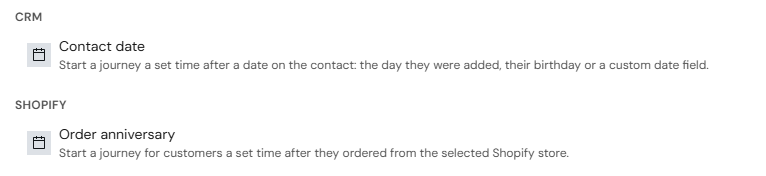
- In Automation, start a new journey, press “Add a trigger” and choose “Contact date” under CRM, then “Custom date fields” and “Last serviced on”.
- Set Time after the date to 6, Unit Months, Repeat to No repeat, and a Time of day when the desk is in.
- Add “Send WhatsApp template” with the visit reminder.
- After every visit, the desk updates “Last serviced on” to the day of the visit. The next reminder then counts from the real visit, not from the schedule.
The last step is the one that fails in practice, so build a net under it. A second journey on the same field at 7 Months sends a “still due” message. A customer whose visit was recorded no longer has the old date, so they don’t match; only the ones still waiting do. We’d make that second message ask for a day, not repeat the first.
Why No repeat rather than Every year? Because the next date should come from the next visit. A repeating rule would keep counting from a visit that may have slipped by three weeks.
Route A, set-up 2: renewal, a date before the end date
The trigger only counts forward and can’t fire before a date. There are two honest ways round that.
Count from last year. If every contract runs exactly twelve months, store “Contract start” and send 11 Months after it: a contract that started on 15 March 2026 gets its reminder on 15 February 2027, a month before it ends. When it renews, the desk changes “Contract start” to the new start date.
Store the reminder date itself. Keep a field such as “Renewal reminder on” that holds the day the message should go, and send 0 Days after it. For a contract ending on 14 March 2027, the field says 14 February 2027. This works for any contract length, including the six-month plans and the three-year deals Jatin’s showroom sells with new purifiers.
| Journey | Date field | Time after | Repeat |
|---|---|---|---|
| Filter change due | Last serviced on | 6 Months | No repeat |
| Filter change still due | Last serviced on | 7 Months | No repeat |
| Renewal, a month ahead | Renewal reminder on | 0 Days | No repeat |
| Renewal, a week ahead | Renewal reminder on | 3 Weeks | No repeat |
The fourth row is the same field again: three weeks after 14 February is 7 March, a week before the end. When a customer renews, the desk changes “Renewal reminder on” to next year’s date, and the week-ahead journey no longer matches them. Don’t put a three-week wait step inside one journey instead; a journey run ends after 30 days, so long gaps belong in the trigger.
For the two renewal journeys, if you record opt-in as a tag or field, check it before the send step. Before publishing each one, press “Count today’s matches” and compare {n} would be enrolled today with what the register says is due. The journeys must be published on the day: days when one was paused or unpublished aren’t made up later.
Route B: without Conecxt, a sheet and a weekly send
The free WhatsApp Business app can’t send on a date. Its business broadcasts can be scheduled, but they’re paid per delivered message and “currently available in limited countries”, and ordinary broadcast lists reach only contacts who have saved your number. So without a tool that reads dates, the sheet does the remembering and a person does the sending.
Keep one row per contract: contract number, name, phone, opt-in to renewal messages (YES or NO), end date in column E, last serviced in column F. Every Monday, a second tab lists renewals ending four to five weeks out:
=FILTER(A2:F4000, E2:E4000>=TODAY()+28, E2:E4000<=TODAY()+34, D2:D4000="YES")For service due, add column G with =EDATE(F2, 6) and filter G for the coming week the same way. Then either send from the Business app chat by chat, or download the filtered rows as a CSV, import them into your WhatsApp tool and send a campaign to that list.
The limits come with the method. A weekly filter lands each reminder 28 to 34 days ahead instead of exactly 30. Someone has to run it every Monday, including the Monday after Lohri. And if two people run it, customers get two messages.
The two routes side by side
| Route A: Conecxt | Route B: sheet and weekly send | |
|---|---|---|
| When it runs | Every day the journeys are published | Every Monday someone remembers |
| Timing | The exact day | Within a week |
| After a visit or renewal | Update the date field | Update the sheet, and re-import if you use a tool |
| Missed visit net | A second journey at 7 Months | A second filter, by hand |
| Volume by hand | None | About 43 messages a working day at Jatin’s size |
Which should Jatin choose?
Route A. His 3,200 contracts produce about 1,100 reminders a month, around 43 a working day, which is too many to send by hand and too many to trust to a Monday filter. A business with 200 contracts is different: the sheet and a weekly hour on the Business app would do.
The real work on either route is the same: someone updates a date after every visit and every renewal. We’d make it the last line of the technician’s job card and the desk’s last task before closing the chat.
What a month costs at 3,200 contracts
About 267 contracts end each month (3,200 ÷ 12). Suppose 2,700 of the 3,200 customers agreed to renewal messages, so 225 a month get two reminders each (Jatin’s figures, illustrative). Rates are Meta’s INR card effective 1 October 2026, per delivered message, before GST.
| Message | Likely category | A month | Meta charge |
|---|---|---|---|
| Renewal reminders, two each | Marketing | 450 | ₹388.40 |
| Filter change due | Utility | 533 | ₹61.30 |
| Filter change still due | Utility | 80 | ₹9.20 |
| Payment due on confirmed renewals | Utility | 60 | ₹6.90 |
| Total | 1,123 | ₹465.80 |
The renewal reminders are 40% of the messages and 83% of the bill. If they could be utility, the same 450 would cost ₹51.75; they can’t, so the saving lies in fewer, better-timed sends, not cleverer wording. WhatsApp also caps marketing per person across all businesses, so a renewal reminder can fail with error 131049; Meta says to wait at least 24 hours, and the week-ahead journey is the natural second try.
On Route A, 3,200 contacts and about 1,100 messages a month sit inside Basic’s 5,000 contacts and 10,000 messages, at ₹2,499 a month. With Meta’s charges that’s ₹2,964.80 a month, and Jatin’s care plan sells at ₹2,200 a year, so two renewals a month that would otherwise have lapsed pay for both.
Before you switch them on
- Every contract has an end date and a last-serviced date, typed as year-month-day
- A five-row import checked before the full one
- Renewal and visit reminders are separate templates, and the visit one carries no offer
- Renewal reminders go only to customers who agreed to them
- Today’s count matches what the register says is due
- The job card and the renewal chat both end with “update the date”
This week, take the twenty contracts ending in March and fill in their “Renewal reminder on” dates by hand. If that takes more than ten minutes, the import needs a column for it. Terms such as marketing template and utility template are in the glossary.
Common questions
Is an AMC renewal reminder on WhatsApp marketing or utility?
Marketing. Meta's category guidelines list messages that attempt to renew subscriptions as marketing, even if requested by users, and say utility updates should not attempt to secure renewals. In India that's ₹0.8631 per delivered message before GST, against ₹0.1150 for a utility template, and it needs the customer's opt-in.
How do I send a WhatsApp reminder before a contract ends?
Store a date the reminder can count forward from. Either use the contract start date and send 11 months after it, or keep a separate date field holding the day the reminder should go, such as one month before the end date, and send on that date. Update the field whenever the contract renews.
Can the WhatsApp Business app send automatic reminders on a date?
No. The free app has no date field and nothing that sends on a given day. Its business broadcasts can be scheduled, but they're paid per delivered message and available only in some countries. Automatic date-based reminders need the WhatsApp Business Platform and a tool that reads dates from your records.
How often should a service-due reminder go on WhatsApp?
Once when the service falls due, counted from the last visit, and once more about a month later if no visit has been recorded. Update the last-serviced date after every visit, so the next reminder counts from the real visit rather than from the original schedule.
Sources
- Template categorization (Meta for Developers) · Updated 15 Sep 2026; read live 26 Nov 2026
- Pricing on the WhatsApp Business Platform (Meta for Developers) · Updated 18 Nov 2026; INR list rates effective 1 Oct 2026; read live 26 Nov 2026
- Get opt-in for WhatsApp (Meta for Developers) · Updated 16 Jun 2026; read live 26 Nov 2026
- Per-user marketing template message limits (Meta for Developers) · Updated 17 Jun 2026; read live 26 Nov 2026
- Template review (Meta for Developers) · Updated 17 Jun 2026; read live 26 Nov 2026
- WhatsApp Business Messaging Policy · Last updated 23 Sep 2026; read live 26 Nov 2026
- About business broadcasts (WhatsApp Help Center) · No date shown; read live 26 Nov 2026
- How to use broadcast lists on the WhatsApp Business app (WhatsApp Help Center) · No date shown; read live 26 Nov 2026
- FILTER function (Google Docs Editors Help) · No date shown; read live 26 Nov 2026
- EDATE function (Google Docs Editors Help) · No date shown; read live 26 Nov 2026
- TODAY function (Google Docs Editors Help) · No date shown; read live 26 Nov 2026
Free PDF
Take this playbook with you
The full playbook as a printable PDF, with every message template ready to adapt.
Run this on your own number
Create an account, connect your WhatsApp number, and invite your team.