
Resources Playbook
Automatic birthday and anniversary wishes on WhatsApp: consent, wording, cost and set-up
A birthday wish from the shop where you bought your wedding silk is a small thing customers remember, as long as they told you the date and agreed to hear from you. Here is how to collect the dates properly, what a greeting costs at Meta's India rate, five templates, and two ways to send them: Conecxt's Contact date trigger, or the WhatsApp Business app and a sheet.
The short version
- Ask for the date at the counter or on the bill, in the customer's own words, with a separate yes to hearing from you on WhatsApp. Never work a date out from a purchase.
- Meta's category guidelines list a birthday greeting as marketing, with or without an offer: ₹0.8631 per delivered message to an Indian number, before GST.
- A year of wishes to 4,300 opted-in customers costs about ₹3,711 in Meta charges, roughly twelve messages a day.
- In Conecxt, the Contact date trigger set to Birthday, 0 Days and Every year sends on the day; a second journey on a custom date field covers wedding anniversaries.
- The WhatsApp Business app has no date field: someone checks the register every morning and sends by hand, which is free and fine at a dozen a day, until the day nobody does.
Keerthana Chettiar runs a silk saree store on South Masi Street in Madurai, with eleven staff, a billing counter that also keeps the customer register, and 6,400 customers in it. (Keerthana and her store are invented.) A good share of them first came for wedding silks. For years her late father-in-law wrote birthdays in a notebook and phoned the regulars himself. The notebook is still in the drawer under the counter, and nobody has opened it since.
She wants automatic birthday wishes on WhatsApp, and wedding-anniversary wishes for the couples who bought their silks with her, that go out on the day without anyone remembering. This playbook covers how to collect the dates so the wish is welcome, what Meta charges for it, five greeting templates, and two ways to send them: Conecxt’s Contact date trigger, or the WhatsApp Business app and a sheet.
The idea, with one date
Store each customer’s birthday once, and a wish goes out on that date every year. A customer tells the counter her birthday is 14 August; the message goes at 9:30 that morning, next year and every year after, until she says stop.
| Date | What happens |
|---|---|
| 3 November 2026 | She buys a Kanchipuram silk, gives her birthday and agrees to wishes on WhatsApp |
| 14 August 2027, 9:30 am | First birthday wish |
| 14 August 2028, 9:30 am | The same wish comes round again |
Someone born on 29 February gets the wish on 28 February in ordinary years.
Collecting dates the customer is glad you have
Ask for the date, in person or on the bill, and write down what the customer says. Don’t fill birthdays from an old loyalty form they’ve forgotten, and never work out a wedding date from when a couple bought their wedding silks. A purchase date isn’t a wedding date, and a shop that guesses gets it wrong for the bride who married six months after buying.
Ask two separate questions at the counter: may we send you a birthday wish on WhatsApp, and would you like to hear about new collections and offers. Meta’s opt-in page says the business must “clearly state the business’s name that a person is opting in to receive messages from”, and a wish is a marketing message (more on that below), so the first yes is the one that counts for wishes. Record the date, the answer and who took it. Our opt-in guide has a table of what to keep.
Where does a greeting turn unwelcome? WhatsApp’s Business Messaging Policy says: “Do not confuse, deceive, defraud, mislead, spam, or surprise people with your communications.” Our rule for Keerthana’s staff:
- No age in the message, ever, even when you know it.
- A wedding anniversary only for people who gave the date themselves. Marriages end and spouses die; a cheerful wish to a widow is the worst message a shop can send.
- One wish per occasion. No reminder the week before and no follow-up the day after.
- A Stop button on every wish, and a staff habit of removing the date when someone mentions a bereavement.
Our personalisation guide draws the same line from the other side: personalise with what the customer knowingly gave you.
The message: marketing, with or without an offer
Meta is likely to class every one of these as marketing. Its template category guidelines put “Strengthen customer relationships through personalized messages” under marketing, and the example given is a birthday greeting: “did you think we’d forget? No way!”. An offer doesn’t change the category, and leaving it out doesn’t make the wish utility.
On Meta’s INR rate card effective 1 October 2026, a delivered marketing template to an Indian number costs ₹0.8631 before GST, so ₹863.10 per 1,000 wishes. None of the five below starts or ends on a variable, because Meta’s review rules say a template “cannot start or end with a parameter”. Each carries a Stop offers button.
| # | For | Template text | Offer | Likely category | Per 1,000 delivered |
|---|---|---|---|---|---|
| 1 | Birthday | Happy birthday, {{1}}! Everyone at Chettiar Silks wishes you a lovely year ahead. | None | Marketing | ₹863.10 |
| 2 | Birthday | Happy birthday, {{1}}! As our gift, take 10% off any one saree this month. Just show this message at the counter. | 10% off | Marketing | ₹863.10 |
| 3 | Wedding anniversary | Happy anniversary to you both, {{1}}. Thank you for letting Chettiar Silks be a small part of the day. | None | Marketing | ₹863.10 |
| 4 | Wedding anniversary | Happy anniversary, {{1}}! If you're celebrating with a new silk, we'll keep 10% off for you until the month ends. | 10% off | Marketing | ₹863.10 |
| 5 | Birthday, in Hindi | जन्मदिन की हार्दिक शुभकामनाएँ, {{1}} जी! Chettiar Silks परिवार की ओर से। | None | Marketing | ₹863.10 |
We’d send number 1 or 3 most years and keep the offer for the birthday of a customer who hasn’t been in for a while. A wish with a discount every single year starts to read like a coupon with a greeting attached. The Hindi version is a separate template submitted in Hindi.
Route A: with Conecxt, the Contact date trigger
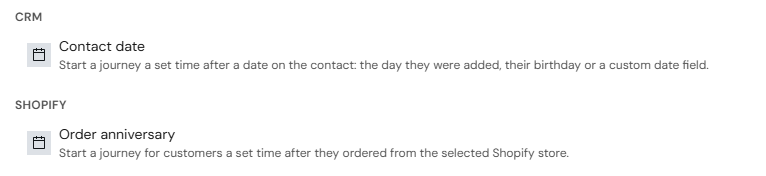
The Contact date trigger starts a journey a set time after a date on the contact: the day they were added, their birthday or a custom date field. It runs for existing contacts only and never adds one, and contacts who are blocked or unsubscribed are left out.
- Put the dates on the contacts. Birthday has its own field. For wedding anniversaries, create a custom field of type Date, such as “Wedding anniversary”. A custom date must be typed as year-month-day with hyphens (
YYYY-MM-DD, so 7 February 2019 starts with 2019, then 02, then 07). A value in any other form never matches and isn’t counted. - Before importing 6,400 rows, try a CSV of five rows and open those five contacts. Check that the birthday and the anniversary landed in the fields you expect, then import the rest.
- In Automation, start a new journey, press “Add a trigger” and choose “Contact date” under CRM.
- Set it as in the table below.
- If you record opt-in as a tag or field, check it before the send step. Then add “Send WhatsApp template” with template 1 and the contact’s first name.
- Test with “Count today’s matches”. Press it once, note the number, then set five staff members’ birthdays to today’s date and press it again:
{n} would be enrolled todayshould rise by exactly five. Nothing is sent by counting. Put their real dates back. - Try a run before publishing, then publish. Build the second journey the same way for the anniversary field.
| Setting | Birthday journey | Anniversary journey |
|---|---|---|
| Date | Birthday | Custom date fields: Wedding anniversary |
| Time after the date, Unit | 0, Days | 0, Days |
| Repeat | Every year | Every year |
| Time of day | 09:30 | 10:00 |
Birthdays and custom dates are whole days, so 0 is right here. Time of day is in your organisation’s local time, in half-hour steps. The journey must be published on the day: days when it was paused or not yet published aren’t made up later, so a wish missed during a pause stays missed.
Route B: without Conecxt, the Business app and a sheet
The free WhatsApp Business app can carry wishes if a person does the remembering. Its help centre describes labels and broadcast lists. Neither holds a date, and nothing in the app sends on a day.
Labels group chats: “You can create up to 20 labels”, applied by holding a chat. The same page now says “Labels are now lists” and that lists are rolling out gradually, so your app may show either. A label per month (“Birthdays: August”) lets the person on duty find the month’s customers quickly, though not the day’s.
Broadcast lists send one message to many contacts, but WhatsApp’s page is plain: “Only contacts who’ve added your number to their phone’s address book will receive your broadcast message.” A general broadcast list holds up to 256 contacts. Business broadcasts are the paid version, charged per delivered message, reviewed by Meta, able to be scheduled, and “currently available in limited countries”. Some people also see a monthly limit of 35 free broadcast messages. For a dozen individual wishes a day, sending one chat at a time is simpler than any broadcast.
The sheet does the remembering. Keep name, phone, birthday, anniversary and the wishes opt-in in columns A to E, and this formula on a second tab lists today’s birthdays among people who said yes:
=FILTER(A2:E7000, TEXT(C2:C7000,"dd-MM")=TEXT(TODAY(),"dd-MM"), E2:E7000="YES")Copy it with column D in place of C for anniversaries. At 9:30 someone opens the tab, sends each wish from the shop phone, and writes “sent” beside the name. The app is free to use, so there’s no Meta charge; our article on whether WhatsApp Business is free explains what is and isn’t.
The cost is the person. Sundays, Deepavali week and the day the billing clerk is on leave are exactly the days the tab doesn’t get opened.
The two routes side by side
| Route A: Conecxt | Route B: Business app and a sheet | |
|---|---|---|
| Who remembers | The trigger, every day the journey is published | A named person, every morning |
| Meta charge per wish | ₹0.8631 (marketing template) | None from the app, one chat at a time |
| Missed days | Paused or unpublished days aren’t made up | Any day nobody opens the sheet |
| Check before going live | Count today’s matches | Read the filtered list |
| Replies | Shared inbox, seen by the whole team | On the shop phone |
Which should Keerthana choose?
Route B for the first month, Route A after it. At about a dozen wishes a day, the sheet and the shop phone cost nothing and teach the staff which wishes get warm replies. If the tab has gone unopened more than twice in that month, move to Route A: about ₹309 a month in Meta charges, plus the plan, buys her out of depending on one person’s mornings.
What it costs at 6,400 customers
If every one of the 6,400 gave a birthday and agreed to wishes, a year would cost 6,400 × ₹0.8631 = ₹5,523.84 before GST. Real registers are thinner. Suppose 3,100 gave a birthday with a yes and 1,200 couples gave an anniversary (her figures, illustrative): 4,300 × ₹0.8631 = ₹3,711.33 a year, about ₹309 a month, or twelve wishes on an average day (4,300 ÷ 365).
On Route A, add the plan. Basic, at ₹2,499 a month, holds 5,000 contacts, so import only the customers who gave a date and agreed, and 4,300 fits. Importing all 6,400 needs Growth at ₹4,299, or Basic with the +10,000 contacts add-on at ₹2,499 + ₹1,599 = ₹4,098 a month, if five team members are enough.
WhatsApp caps how many marketing templates one person receives from all businesses together. A wish held back fails with error 131049, and Meta says to wait at least 24 hours before retrying. We wouldn’t retry: a birthday wish a day late reads as an afterthought.
Before the first wish goes out
- Every date came from the customer, with a separate yes to wishes on WhatsApp, recorded with who took it
- No wish mentions age, and anniversaries go only to people who gave the date
- The templates are approved, each with a Stop offers button
- Route A: five-row import checked, today’s count rose by five on the test, real dates put back
- Route B: the filter tab works on today’s date, and one person and one stand-in own it
- Someone answers replies on the day
Start at the counter this week: add the two questions to the bill and ask the next fifty customers. Terms such as marketing template and opt-in are in the glossary.
Common questions
Can WhatsApp Business send birthday wishes automatically?
The free WhatsApp Business app can't: it has no date field and nothing that sends on a given day, so someone checks the dates each morning and sends by hand. On the WhatsApp Business Platform, a tool that stores each customer's birthday can send an approved template on the day, every year.
Is a birthday wish on WhatsApp a marketing message?
Yes, expect marketing. Meta's template category guidelines give a birthday greeting as an example of a marketing template that builds customer relationships, whether or not it carries an offer. In India it costs ₹0.8631 per delivered message before GST, and it may go only to customers who agreed to hear from you.
How much do automatic birthday wishes on WhatsApp cost?
Meta charges ₹0.8631 per delivered marketing template to an Indian number, before GST, on its rate card effective 1 October 2026. A store sending birthday and anniversary wishes to 4,300 opted-in customers pays about ₹3,711 a year, roughly ₹309 a month. Your WhatsApp tool's plan is separate.
How should a shop collect customers' birthdays for WhatsApp wishes?
Ask in person or on the bill, and write down what the customer says: the date, whether they want a wish on WhatsApp, and separately whether they want offers. Don't take a date from a form they've forgotten or work one out from a purchase. Give every wish a Stop button and honour it.
Sources
- Template categorization (Meta for Developers) · Updated 15 Sep 2026; read live 26 Nov 2026
- Pricing on the WhatsApp Business Platform (Meta for Developers) · Updated 18 Nov 2026; INR list rates effective 1 Oct 2026; read live 26 Nov 2026
- Get opt-in for WhatsApp (Meta for Developers) · Updated 16 Jun 2026; read live 26 Nov 2026
- Per-user marketing template message limits (Meta for Developers) · Updated 17 Jun 2026; read live 26 Nov 2026
- Template review (Meta for Developers) · Updated 17 Jun 2026; read live 26 Nov 2026
- WhatsApp Business Messaging Policy · Last updated 23 Sep 2026; read live 26 Nov 2026
- How to use labels (WhatsApp Help Center) · No date shown; read live 26 Nov 2026
- How to use broadcast lists on the WhatsApp Business app (WhatsApp Help Center) · No date shown; read live 26 Nov 2026
- How to use broadcast lists (WhatsApp Help Center) · No date shown; read live 26 Nov 2026
- About business broadcasts (WhatsApp Help Center) · No date shown; read live 26 Nov 2026
- How to create and send a business broadcast (WhatsApp Help Center) · No date shown; read live 26 Nov 2026
- About broadcast limits (WhatsApp Help Center) · No date shown; read live 26 Nov 2026
- FILTER function (Google Docs Editors Help) · No date shown; read live 26 Nov 2026
- TEXT function (Google Docs Editors Help) · No date shown; read live 26 Nov 2026
Free PDF
Take this playbook with you
The full playbook as a printable PDF, with every message template ready to adapt.
Run this on your own number
Create an account, connect your WhatsApp number, and invite your team.