
Resources Playbook E-commerce & D2C
Shopify reorder reminder on WhatsApp: a replenishment nudge timed to your own reorder gap
A replenishment reminder works when it arrives a few days before the tin runs out, and annoys when it arrives after the customer has already reordered. Here is how to time it from your own orders, set it up with Conecxt's Order anniversary trigger or with Shopify Flow, and what it costs at Meta's India rate.
The short version
- Take the median gap between your repeat buyers' first and second orders, subtract the delivery time, and send the reminder on that day after each order.
- Switch on 'Skip customers who have ordered again since', so nobody who has already reordered is told they're running low.
- The Order anniversary trigger counts from the order date for every order and can't tell products apart, so it suits a store with one main consumable or one typical cycle. A mixed catalogue needs per-product timing in Shopify Flow, or one neutral message.
- Shopify Flow's Wait works here, because a reorder gap is under its 90-day limit, but Flow still can't send the WhatsApp message itself.
- A reorder reminder is a marketing template: ₹0.8631 per delivered message in India before GST, so 1,000 delivered reminders cost ₹863.10.
Parth Raichura sells cold-pressed groundnut oil and A2 ghee from Rajkot through a Shopify store: about 1,600 orders a month, a team of eight, and a wooden ghani press in a shed on the edge of the city that runs from six in the morning. (Parth and his business are invented for this playbook.) A family of four gets through his 5-litre tin in about six weeks, and when it runs dry at 7 pm the cook sends someone to the corner shop for whatever is on the shelf.
A Shopify reorder reminder on WhatsApp, a few days before the tin is empty, is Parth’s way of being in the kitchen at that moment. This playbook covers picking the number of days from the store’s own orders, the message and what it costs, then two set-ups: Conecxt’s Order anniversary trigger with days instead of a year, and Shopify Flow. Our playbook on Shopify order-anniversary reminders uses the same trigger for once-a-year occasions.
The idea, with one date
Send each buyer one message a set number of days after their order, timed so a reorder arrives before the last one runs out. Parth’s buyers usually reorder about 42 days apart and delivery takes up to six days, so he sends on day 36.
| Date | What happens |
|---|---|
| 5 January 2027 | A 5-litre tin is ordered |
| 10 February 2027 (36 days later) | Reminder on WhatsApp |
| About 16 February 2027 | The tin runs dry, and a reorder has already arrived |
If the buyer reorders on 2 February, the 10 February reminder should not go. Everything below is built around that rule.
How do you pick the number of days?
From your own orders, not a guess about how fast people cook. Export them from the Orders page in Shopify (the CSV carries the order number, the customer’s email and phone, and “Created at”), then in a sheet:
- Keep only customers with two or more orders.
- For each, work out the days between their first and second order.
- Drop gaps over 120 days. Those people lapsed and came back; they’re a win-back question, not a cycle.
- Take the median of what’s left, not the average, because a few slow buyers drag the average up.
- Subtract your slowest common delivery time.
Parth’s sheet, with his numbers as an illustration:
| Buyers with a second order | Median gap | Average gap | Slowest common delivery | Send on day |
|---|---|---|---|---|
| 3,900 | 42 days | 49 days | 6 days (outside Gujarat) | 36 |
Recheck it every quarter. A price change, a bigger tin or a winter of extra frying moves the gap, and the reminder should move with it.
What you need, and what the message costs
You need a number on the WhatsApp Business Platform, an approved marketing template, a phone on each buyer’s Shopify customer record, and opt-in to offers on WhatsApp. Meta’s opt-in page asks that you “clearly state the business’s name” the person is opting in to hear from; our opt-in guide has wording for the order page.
Meta is likely to class a reorder nudge as marketing. Its guidelines list messages that “Promote or recommend offers, products, or services” to people who “engaged with you”, and add: “These are marketing even if requested by users.” On Meta’s INR rate card effective 1 October 2026, that’s ₹0.8631 per delivered message to an Indian number, before GST, or ₹863.10 per 1,000 delivered.
Our Shopify WhatsApp templates set already has a reorder reminder (number 12). Its third variable is the product, and Route A below has no product name to fill it with. So Parth’s version names nothing it can’t know:
Hi {{1}}, your last order from Raichura Ghani left us about five
weeks ago. If the kitchen is running low, the same order can be at
your door in three to four days.
[Reorder]  [Not yet]  [Stop offers]
Route A: with Conecxt, the Order anniversary trigger set in days
The trigger reads the store’s orders from Shopify each day and starts a journey for each buyer whose order was placed the set number of days earlier. Shopify shares the last 60 days of orders with any app, so a 36-day gap fits; longer gaps need the full order history permission, which Conecxt asks for when you connect the store.
- Connect the store from Integrations in Conecxt.
- Write the template in Conecxt and submit it to Meta.
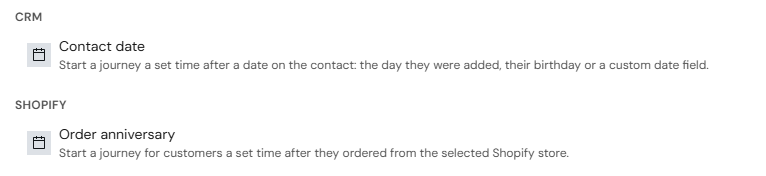
- In Automation, start a new journey, press “Add a trigger” and choose “Order anniversary” under SHOPIFY.
- Set the trigger:
| Setting | Parth’s choice | Why |
|---|---|---|
| Time after the date, Unit | 36, Days | His median gap minus delivery |
| Repeat | No repeat | Each new order starts its own count |
| Time of day | 18:00 | His local time, when people are planning the evening meal |
| Enrol | Once per customer per day | Two orders on one day, one reminder |
| Skip customers who have ordered again since | On | Someone who reordered on day 30 hears nothing on day 36 |
| Paid orders only | On, then check the count | See the note on cash on delivery below |
| Skip cancelled orders | On | A cancelled order isn’t a tin in the kitchen |
| Minimum order value | ₹600 | Leaves out 500 ml trial bottles, which run on a different clock |
- If you record opt-in as a tag or field, check it before the send step. Then add “Send WhatsApp template” and fill
{{1}}with the shopper’s first name. - Press “Count today’s matches” and read both numbers:
{n} would be enrolled todayand{k} skipped: no phone or email. Nothing is sent by counting. - Try a run before publishing, then publish. Days when the journey wasn’t published aren’t made up later.
“Skip customers who have ordered again since” is the setting that makes this a service rather than a nag. Leave it off and a buyer who reordered last week gets “running low?” about a tin that arrived yesterday.
On cash on delivery: “Paid orders only” is on unless you change it. If your COD orders stay unpaid in Shopify until the cash is collected, the count will show fewer matches than you expect. Compare a day’s count with that day’s orders before deciding.
The limit: one clock for every product
The trigger counts from the order date for every order and can’t tell products apart. There’s no product name among its values and no filter by product, so a 1-kg jar of ghee and a 5-litre tin of oil get the same 36 days.
That suits a store with one main consumable, or several products bought together on one rhythm. It doesn’t suit a mixed catalogue. Parth’s ghee-only buyers reorder nearer every ten weeks, and a day-36 “running low?” is a month early for them. His choices, and the trade-off of each:
- One neutral message on the oil’s cycle. Ghee-only buyers get it early. Cheap and simple, slightly wrong for a minority.
- Raise the “Minimum order value” so small ghee-only orders fall out. Crude, and it only works if the products sit at different prices.
- Do the per-product timing in Shopify Flow (Route B), where a condition can look at what was in the order.
- For an occasional campaign, a Shopify customer segment such as
products_purchased MATCHES (tag = 'ghee', date BETWEEN -75d AND -68d)finds ghee buyers from about ten weeks ago, and you send them a campaign.
Our view: if more than about a fifth of your orders are on a different cycle, don’t force one clock on everyone.
Route B: without Conecxt, Shopify Flow and your current WhatsApp app
Flow can time this one properly. Its Wait action allows up to 90 days, and a reorder gap sits well inside that. What Flow can’t do is send a WhatsApp message: Shopify’s list of Flow actions has tags, internal email and HTTP requests, and no WhatsApp step.
- Create a workflow with the trigger “Order created”.
- For a mixed catalogue, add a condition on the order’s line items, such as “At least one of” the line items’ product tags equal to
oil-5l. Make a second workflow forgheewith its own wait. - Add Wait: 36 days.
- Add a condition that the customer hasn’t ordered since. The customer record has a
lastOrderfield, and Flow can compare it with the order that started the workflow if your editor offers a dynamic value for that field; Shopify notes that “Dynamic values aren’t available for all fields”. Shopify’s Wait page says store data “is refreshed” when the wait ends, so the check sees today’s orders. - Add “Add customer tags” with
reorder-due, and have your WhatsApp app send on that tag, call it through “Send HTTP request” (Grow, Advanced and Plus plans only), or mail the day’s list with “Send internal email”.
Long waits have side effects. The workflow starts only for orders placed after you switch it on, so the first reminders go out 36 days later. And Shopify’s Wait page warns that editing a workflow changes the runs already waiting, while deactivating or deleting it stops them all.
The two routes side by side
| Route A: Conecxt | Route B: Shopify Flow and your app | |
|---|---|---|
| First reminders | From the day you publish, using past orders | 36 days after you switch it on |
| Different timing per product | No | Yes, one workflow per product |
| Skips buyers who reordered | A setting | A condition you build and test |
| Who sends | Conecxt | Your current WhatsApp app |
| Count before sending | Count today’s matches | Watch the workflow’s runs |
| Replies | Shared inbox, orders beside the chat | Wherever your app shows them |
| Extra monthly cost | A Conecxt plan, from ₹2,499 | None for Flow |
Which should Parth choose?
Route A for the oil, which is about four orders in five. It starts with past orders on day one, and the reordered-since check is a switch, not a condition to debug. He’d keep the message neutral and accept that ghee-only buyers hear from him early.
If his ghee grows past a fifth of orders, Route B earns its keep, provided his WhatsApp app can send on a Shopify tag. Without that, Flow’s careful timing ends as an email list.
What it costs, with Parth’s numbers
Suppose his 1,600 orders a month come from 1,450 buyers, about 350 of them reorder before day 36 and are skipped, and 780 of the rest opted in to offers (his figures, illustrative). That’s 780 × ₹0.8631 = ₹673.22 a month before GST. He keeps about ₹380 on a ₹1,850 tin, so two reorders a month cover Meta’s charge.
On Route A, add the plan: Basic is ₹2,499 a month with 5,000 contacts. Buyers the trigger picks up who aren’t contacts yet are added as contacts; repeat buyers are added once, so the count grows slower than orders. At about 900 new contacts a month, he passes 5,000 in his sixth month (900 × 6 = 5,400). Growth, at ₹4,299, holds 10,000, and 10,000 more cost ₹1,599 a month.
WhatsApp also caps how many marketing templates one person receives from all businesses together. A held-back reminder fails with error 131049, and Meta says to wait at least 24 hours before trying again; for a reorder nudge we’d let it go and wait for the next order.
Before you switch it on
- The days come from your own median reorder gap, minus delivery
- “Skip customers who have ordered again since” is on (Route A), or the last-order condition is tested (Route B)
- The template names nothing the trigger can’t fill, and has a Stop offers button
- Only customers who opted in to offers on WhatsApp will get it
- Today’s count is read, including the skipped number and the effect of COD orders
- Someone answers replies at the hour the reminder goes
Open last quarter’s order export tonight and work out your median gap. That one number decides the setting, the template wording and whether one clock fits your catalogue. Terms such as marketing template and per-user limit are in the glossary.
Common questions
How many days after an order should a reorder reminder go?
Take your repeat buyers' usual gap between their first and second orders, use the median rather than the average, and subtract the days delivery takes. If the median gap is 42 days and delivery takes up to six, send on day 36. Recheck the gap every few months as your buyers change.
Is a reorder reminder on WhatsApp a marketing or utility message?
Expect marketing. Meta's category guidelines list messages that recommend products or call past customers to action as marketing, even if requested by users. In India that costs ₹0.8631 per delivered message before GST, and it may go only to customers who opted in to offers from you on WhatsApp.
Can Shopify Flow send a WhatsApp reorder reminder?
Flow can do the timing. Its Wait action allows up to 90 days, so an Order created workflow can wait 36 days, check whether the customer has ordered since and tag them. Shopify's own list of Flow actions has no WhatsApp step, so your WhatsApp app has to send on that tag.
How do I stop a reorder reminder going to someone who already reordered?
Check for a newer order just before sending. In Conecxt's Order anniversary trigger, switch on Skip customers who have ordered again since. In Shopify Flow, add a condition after the Wait that compares the customer's last order with the order that started the workflow, which Flow refreshes when the wait ends.
Sources
- Pricing on the WhatsApp Business Platform (Meta for Developers) · Updated 18 Nov 2026; INR list rates effective 1 Oct 2026; read live 26 Nov 2026
- Template categorization (Meta for Developers) · Updated 15 Sep 2026; read live 26 Nov 2026
- Per-user marketing template message limits (Meta for Developers) · Updated 17 Jun 2026; read live 26 Nov 2026
- Get opt-in for WhatsApp (Meta for Developers) · Updated 16 Jun 2026; read live 26 Nov 2026
- Exporting orders (Shopify Help Center) · No date shown; read live 26 Nov 2026
- Shopify Flow (Shopify Help Center) · No date shown; read live 26 Nov 2026
- Order created (Shopify Help Center, Flow triggers) · No date shown; read live 26 Nov 2026
- Wait (Shopify Help Center, Flow actions) · No date shown; read live 26 Nov 2026
- Conditions in Shopify Flow (Shopify Help Center) · No date shown; read live 26 Nov 2026
- Actions in Shopify Flow (Shopify Help Center) · No date shown; read live 26 Nov 2026
- Send HTTP request (Shopify Help Center, Flow actions) · No date shown; read live 26 Nov 2026
- Shopify-based customer segment filters (Shopify Help Center) · No date shown; read live 26 Nov 2026
- Customer, lastOrder field (Shopify GraphQL Admin API) · No date shown; read live 26 Nov 2026
- API access scopes: read_all_orders (Shopify developer documentation) · No date shown; read live 26 Nov 2026
Free PDF
Take this playbook with you
The full playbook as a printable PDF, with every message template ready to adapt.
Run this on your own number
Create an account, connect your WhatsApp number, and invite your team.