
Features
Automation
Set a follow-up up once, and it runs for every customer without you.
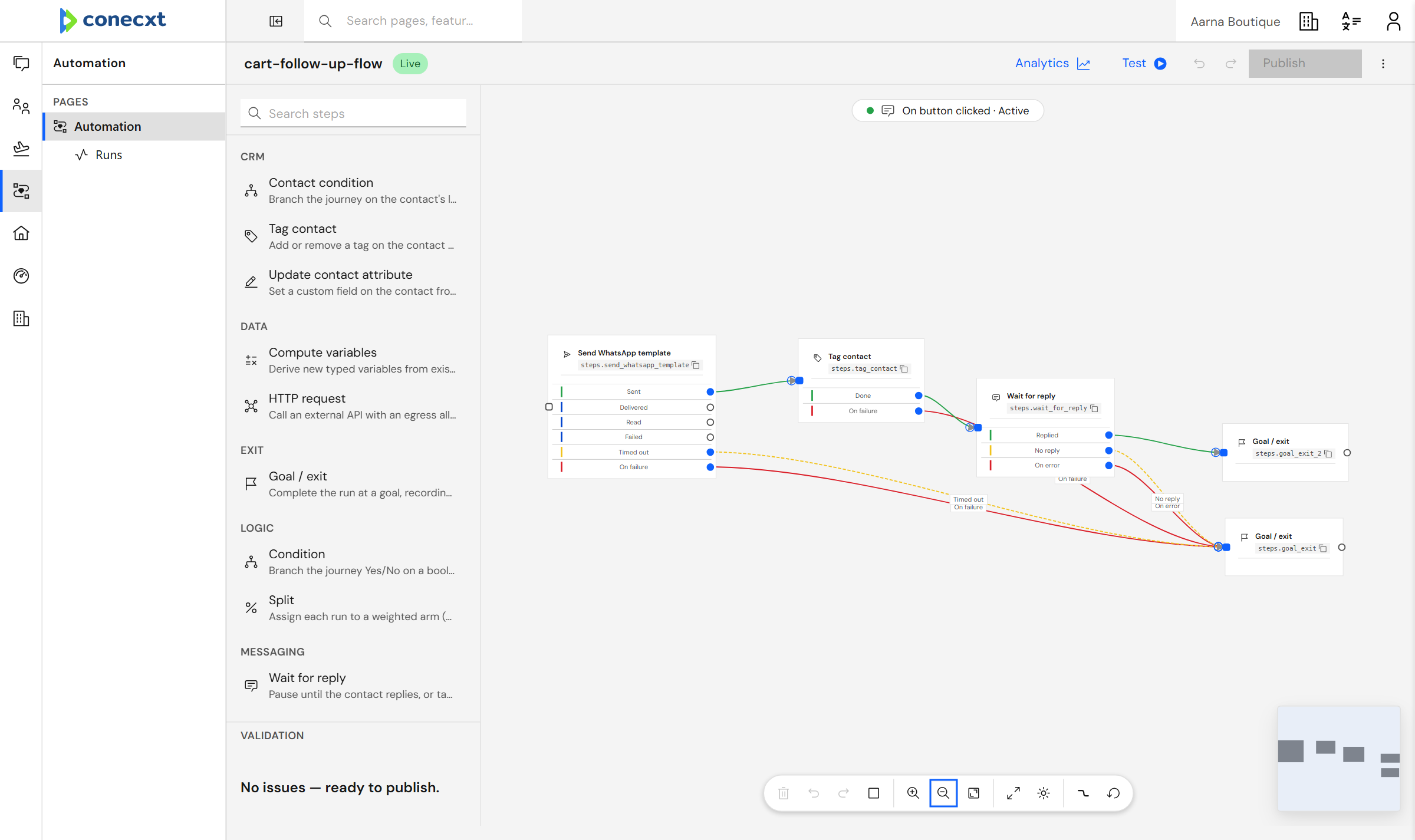
Drag steps, join them upNo code to write.
What you get
What automation does today.
15 live today
- Drag-and-drop journey canvas builder
- Runs keep their place — a follow-up resumes exactly where it stopped
- Ready-made steps: send, tag, wait, branch, call your systems
- Branch on whether a message was delivered, read or failed
- Start a follow-up from a message, a button tap, or your own event
- Start a follow-up from an event you send us
- Start from a ready-made follow-up
- Use customer details anywhere in a follow-up
- Look up your own values to decide what happens next
- Test a follow-up before publishing, without touching your real numbers
- See every follow-up that ran, and retry the ones that failed
- See where people drop out of a follow-up
- Control what a follow-up may reach, and keep your keys safe
- Connect your own systems, each with its own login
- Call your own systems in the middle of a follow-up
Automation
Every outcome has a next step
Each step says what happens next: delivered, read, replied, no reply or failed.
Questions
Do I need to write code?
No. You drag steps onto a canvas and join them up.
What can a follow-up react to?
A message arriving, a button tapped, a webhook from your own system, or what WhatsApp reports back about a message.
Can I try one before it goes live?
Yes. A test run does not touch your real numbers.
Try it with your own conversations
Build your first follow-up.