
Resources Playbook E-commerce & D2C
Message customers who ordered last year: a Shopify order anniversary reminder on WhatsApp
Flowers, cakes and gifts are bought for dates that come round every year. Here is how to send each Shopify buyer a WhatsApp reminder a week before the date they ordered for last time, two ways: with Conecxt's Order anniversary trigger, and with Shopify Flow and the WhatsApp app you already use.
The short version
- Count 358 days from each order and the reminder lands one week before the same date this year (eight days when a 29 February falls in between).
- An 'it's been a year' reminder is a marketing template. Meta charges ₹0.8631 per delivered message to an Indian number, before GST, and it may go only to buyers who opted in to offers on WhatsApp.
- Shopify Flow can find last year's orders with a daily scheduled workflow, but its Wait step stops at 90 days, one lookup returns at most 100 orders, and Flow's own actions can't send a WhatsApp message.
- In Conecxt, the Order anniversary trigger reads the store's orders from Shopify each day, so last year's orders count from the first day. It has no product name and no product filter.
- Count before you publish: the trigger's panel shows how many buyers would be enrolled today and how many were skipped for having no phone or email.
Roshni Sequeira sells flowers and gift hampers from Pune through a Shopify store: about 1,100 orders a month, a team of nine, two delivery vans and a cold room behind the shop in Aundh. (Roshni and her shop are invented for this playbook.) Most of her orders are for a date: a daughter in Bengaluru sends roses to her parents in Kothrud for their wedding anniversary, a husband orders a hamper two days before his wife’s birthday. So Roshni wants to message customers who ordered last year, about a week before the date comes round again.
Those dates return every year, and the buyer will order from whoever reaches them first. This playbook shows the idea with one date, what you need either way, the message with its category and cost, then two routes: Conecxt’s Order anniversary trigger, and Shopify Flow handing over to the WhatsApp app you already have.
The idea, worked through one date
Send each buyer one WhatsApp message a week before the date they ordered for last year. A customer who ordered on 9 March 2026 gets the reminder on 2 March 2027, 358 days later, while there’s still time to plan.
| Date | What happens |
|---|---|
| 9 March 2026 | Bouquet ordered for her parents’ anniversary |
| 2 March 2027 (358 days later) | Reminder on WhatsApp |
| 9 March 2027 (7 days later) | The same date, a year on |
The count starts from the order date, which for a florist is often a day or two before the occasion, so the buyer gets a little more than a week. When a 29 February falls in between (orders from 1 March 2027 to 28 February 2028), 358 days lands eight days early.
Unlike an order confirmation, nothing happens in the store on the reminder day, so something has to look back through last year’s orders each morning.
What you need either way
Four things, whichever route you take:
- A number on the WhatsApp Business Platform (the API). Shopify can’t drive the free Business app.
- One marketing template approved by Meta.
- Opt-in. Meta’s opt-in page says you must “clearly state the business’s name that a person is opting in to receive messages from”, and a number typed at the payment step isn’t that. Our opt-in guide has wording for the order page.
- A phone on the Shopify customer record. Both routes work from the customer, not the delivery address, so a gift order with only the recipient’s number gives you nothing to message.
The message: a marketing template at 86 paise
Meta is likely to class this as marketing. Its category guidelines put “personalized messages or … prompting new conversations” and calls to action to people who “engaged with you” under marketing, and say those “are marketing even if requested by users”. On Meta’s INR rate card effective 1 October 2026, a delivered marketing template to an Indian number costs ₹0.8631 before GST. Our category guide covers the edge cases.
Hi {{1}}, around this time last year you sent flowers through
Sequeira Florals. If that day is coming round again, we can have
them at the door on the morning itself.
[See this week's flowers]  [Stop offers]
{{1}} is the buyer’s first name; our personalisation guide covers names that are missing or in capitals. The text doesn’t start or end on a variable, because Meta’s review rules say a template “cannot start or end with a parameter”. It doesn’t name the product either: Route A can’t fill one, and reminding someone of the lilies they sent to a funeral is a risk no florist should take.
Some of Roshni’s buyers live abroad. Meta charges by the recipient’s country, so a UAE number costs ₹4.2114 on the same card, and WhatsApp doesn’t currently deliver marketing templates to US numbers.
Route A: with Conecxt, the Order anniversary trigger
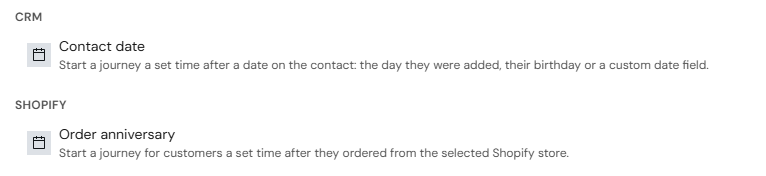
The trigger reads the store’s orders from Shopify each day and starts a journey for each buyer whose order date matches. Nothing is imported, and last year’s orders count from the first day.
- Connect the store. In Conecxt, open Integrations, choose Shopify and approve the permissions. One of them is your full order history: without it Shopify shares only the last 60 days of orders with an app.
- Write the template in Conecxt and submit it to Meta.
- Go to Automation, start a new journey, press “Add a trigger” and choose “Order anniversary” under SHOPIFY.
- Set the trigger as below.
| Setting | Roshni’s choice | Why |
|---|---|---|
| Time after the date, Unit | 358, Days | A week before the same date this year |
| Repeat | No repeat | Next year’s reminder comes from this year’s order |
| Time of day | 10:30 | Her local time, in half-hour steps; 10:00 unless changed |
| Enrol | Once per customer per day | Two orders on one day, one message |
| Paid orders only, Skip cancelled orders | On, On | Leaves out orders that never went through |
| Skip customers who have ordered again since | Off | A birthday in June and an anniversary in March each deserve a reminder |
| Minimum order value | ₹800 | Leaves out single-stem add-ons |
- If you record opt-in as a tag or field, check it before the send step. Then add “Send WhatsApp template” and fill
{{1}}with the shopper’s first name. The other values are the last and full name, phone, email, order number, order total, currency, payment status, the original date and the matched date. There’s no product name and no filter by product. - Press “Count today’s matches”. The panel answers
{n} would be enrolled todayand{k} skipped: no phone or email. Nothing is sent by counting. A high skipped number means the order page isn’t capturing phones. - Try a run before publishing, watch it step by step, then publish.
The journey must be published on the day: days when it was paused or unpublished aren’t made up later, and a settings change applies from the next day due.
Route B: without Conecxt, Shopify Flow and your current WhatsApp app
Shopify Flow, Shopify’s own automation app, is free on the Basic, Grow, Advanced and Plus plans. It can find last year’s orders. It can’t send the message: its list of actions has internal email, tags and HTTP requests, and no WhatsApp step.
Why not wait a year after each order? Shopify’s Wait page says the action delays steps “for a maximum of 90 days per workflow”, a longer wait means “the workflow can’t be activated”, and for longer gaps it suggests “a scheduled workflow instead with a ‘Get data’ action”. That’s what these steps build.
- Create a workflow with the trigger “Scheduled time”. Set a start date and 9:00 in the morning (the store’s time zone by default), then add a repeat rule of 1 Days.
- Add “Get order data”, set “Maximum number of results” to 100, choose Advanced and enter the query below. Shopify’s own example on that page filters on
updated_at;created_atandfinancial_statusare order filters listed in Shopify’s API reference. - Add “For each loop (iterate)” over the orders found, and inside it “Add customer tags” with a tag such as
anniversary-due. - Hand over to your WhatsApp app. Ask its support whether it can send a template to customers carrying a Shopify tag, or adds its own action to Flow; if so, point it at
anniversary-due. If it accepts API calls, Flow’s “Send HTTP request” can call it per order, but Shopify lists that action only on the Grow, Advanced and Plus plans. Otherwise use “Send internal email” to mail the day’s list to the team. - Clear the tag later with a second workflow: the trigger “Customer tags added”, then Wait 7 days, then “Remove customer tags”. Shopify warns not to use “Add customer tags” in a workflow started by “Customer tags added”, or it runs forever.
- For the first week, put “Send internal email” in place of step 3 and compare each day’s list with that date’s orders in Shopify.
created_at:<='{{ scheduledAt | date_minus: "358 days" }}' AND created_at:>'{{ scheduledAt | date_minus: "359 days" }}' AND financial_status:paidThe limits are Shopify’s own. One lookup returns at most 100 orders. Roshni’s average day is about 37 (1,100 ÷ 30), which fits, but Valentine’s Day runs far past 100 and the rest are dropped without a warning, so split those days into several lookups with narrower windows. Shopify warns that when a query fails “the API will return all results (instead of none)”, which is why step 6 matters. Flow tags customers who have no phone. And if your app can’t act on a tag or an API call, the route ends as a list your team sends by hand.
For a one-off campaign, Shopify’s customer segments filter on last_order_date, so last_order_date BETWEEN -365d AND -358d finds a week’s worth. It reads only each customer’s latest order, so anyone who has ordered since is missed.
The two routes side by side
| Route A: Conecxt | Route B: Shopify Flow and your app | |
|---|---|---|
| Last year’s orders from day one | Yes, read from Shopify each day | Looked up each day; step 6 checks the lookup finds them |
| Who sends | Conecxt, on a number connected to it | Your current WhatsApp app |
| It works only if | The phone is on the Shopify customer record | Your app sends on a tag or an API call |
| Count before sending | Count today’s matches | An internal email for the first week |
| Peak dates such as Valentine’s Day | Check that morning’s count | 100 orders per lookup; split the day |
| Filter by product | No | Yes, with a Flow condition |
| Replies | Shared inbox, orders beside the chat | Wherever your app shows them |
| Extra monthly cost | A Conecxt plan, from ₹2,499 | None for Flow |
Which one should Roshni choose?
Route A, in her case. Her chats run on the free Business app, which can’t act on a Shopify tag, so Route B would end every morning as an email list, and Valentine’s week would break the 100-order lookup when it matters most.
Take Route B if your WhatsApp app already sends on a customer tag and someone will look after two workflows. It costs nothing extra, and it’s the only one of the two that can pick out buyers of a particular product.
What it costs, with Roshni’s numbers
Meta’s charge is the same on both routes: ₹0.8631 per delivered marketing template to an Indian number, before GST, and nothing for a message that isn’t delivered. Suppose her 1,100 orders a month come from about 1,000 different buyers, and 650 of them ticked the box for offers on WhatsApp (her figures, illustrative). That’s 650 × ₹0.8631 = ₹561.02 a month, or ₹6,732.18 a year. Her margin on a ₹1,450 bouquet is about ₹420, so two repeat orders a month pay Meta’s charge.
On Route A, add the plan. Basic is ₹2,499 a month with 5,000 contacts and 10,000 messages. Every buyer the trigger picks up who isn’t already a contact is added as one, so if about 850 a month are new to Conecxt, she passes 5,000 in her sixth month (850 × 6 = 5,100). Growth, at ₹4,299, holds 10,000 contacts, and 10,000 more cost ₹1,599 a month.
WhatsApp also caps how many marketing templates one person receives from all businesses together; a held-back message fails with error 131049, and Meta says to wait at least 24 hours before trying again. See our 131049 guide, and the win-back playbook for buyers who stopped ordering altogether.
Before you switch it on
- The template is approved, with a Stop offers button and no variable at the start or end
- Only buyers who opted in to offers on WhatsApp will receive it, and that record lives somewhere you can check
- Today’s count is in, and the skipped number (no phone or email) is small enough to live with
- You’ve tried a run (Route A) or a test from your app (Route B) and read the wording with a real first name in it
- Someone is named to answer replies each morning
- For Route B: the 100-order limit is planned for on peak dates, and the tag is cleared after a week
Start with one number: open Shopify, filter last year’s orders to next week’s dates, and count how many have a phone on the customer record. That count times ₹0.8631 is the most next week’s reminders can cost. Terms such as template category and per-user limit are in the glossary.
Common questions
How do I message Shopify customers who ordered from me a year ago?
Something has to look up last year's orders every morning, because nothing happens in the store on the reminder day. Either a WhatsApp tool reads your Shopify orders a set number of days after each order date, or a daily Shopify Flow workflow finds them and tags the customers for your WhatsApp app to message.
Can Shopify Flow send a WhatsApp message a year after an order?
Not by itself. Flow's Wait action stops at 90 days, and its own list of actions has no step that sends a WhatsApp message. A scheduled workflow can look up the orders from a year ago each day and tag those customers, and your WhatsApp app then has to send on that tag.
Is a WhatsApp reminder to last year's buyers marketing or utility?
Expect marketing. Meta's category guidelines list messages that prompt a new conversation or call past customers to action as marketing, even if requested by users. In India that is ₹0.8631 per delivered message before GST, and it may go only to buyers who opted in to offers from you on WhatsApp.
What does an order anniversary reminder cost on WhatsApp?
Meta charges ₹0.8631 for each delivered marketing template to an Indian number, before GST, on its rate card effective 1 October 2026. In this playbook's example, 650 opted-in buyers a month cost ₹561.02. Undelivered messages cost nothing, and your WhatsApp tool's plan is charged separately.
Sources
- Pricing on the WhatsApp Business Platform (Meta for Developers) · Updated 18 Nov 2026; INR list rates effective 1 Oct 2026; read live 26 Nov 2026
- Template categorization (Meta for Developers) · Updated 15 Sep 2026; read live 26 Nov 2026
- Per-user marketing template message limits (Meta for Developers) · Updated 17 Jun 2026; read live 26 Nov 2026
- Get opt-in for WhatsApp (Meta for Developers) · Updated 16 Jun 2026; read live 26 Nov 2026
- Template review (Meta for Developers) · Updated 17 Jun 2026; read live 26 Nov 2026
- Shopify Flow (Shopify Help Center) · No date shown; read live 26 Nov 2026
- Wait (Shopify Help Center, Flow actions) · No date shown; read live 26 Nov 2026
- Scheduled time (Shopify Help Center, Flow triggers) · No date shown; read live 26 Nov 2026
- Get order data (Shopify Help Center, Flow actions) · No date shown; read live 26 Nov 2026
- Actions in Shopify Flow (Shopify Help Center) · No date shown; read live 26 Nov 2026
- Send HTTP request (Shopify Help Center, Flow actions) · No date shown; read live 26 Nov 2026
- Customer tags added (Shopify Help Center, Flow triggers) · No date shown; read live 26 Nov 2026
- Shopify-based customer segment filters (Shopify Help Center) · No date shown; read live 26 Nov 2026
- orders query, search filters (Shopify GraphQL Admin API) · No date shown; read live 26 Nov 2026
- API access scopes: read_all_orders (Shopify developer documentation) · No date shown; read live 26 Nov 2026
Free PDF
Take this playbook with you
The full playbook as a printable PDF, with every message template ready to adapt.
Run this on your own number
Create an account, connect your WhatsApp number, and invite your team.